Overview
When deploying containerized applications, one common need is visibility into the runtime environment, things like available memory, without adding bloat to the application itself. In this hands-on, I built a custom Docker-based GitHub Action that accepts an input parameter (a greeting), spins up a Debian container during the CI/CD workflow, reads memory info from the runner’s /proc/meminfo, and passes it back to the workflow as an output.
This exercise demonstrates how GitHub Actions can do more than just run tests, they can be extended with custom container logic to inspect and report on the build environment itself.
Repository
What I Built
The project is composed of four files, each with a distinct responsibility:
| File | Purpose |
|---|---|
entrypoint.sh | Shell script that runs inside the container |
Dockerfile | Defines the container image for the action |
action.yml | Declares inputs, outputs, and how the action runs |
.github/workflows/workflow.yml | The GitHub workflow that triggers and calls the action |
Step 1 - The Entry Point Script (entrypoint.sh)
This is the script that runs inside the Docker container when the action is triggered. It does two things: prints a greeting using the input passed from the workflow, and reads the first line of /proc/meminfo to capture total memory, then writes it to $GITHUB_OUTPUT so the workflow can use it downstream.
#!/bin/sh
echo "Hello $INPUT_MYINPUT"

# Read just the first line of memory info to keep output clean
memory=$(head -n 1 /proc/meminfo)

# Modern way to pass data back to the GitHub Actions workflow
echo "memory=$memory" >> "$GITHUB_OUTPUT"
Example output in the runner logs:
Hello Chad
Step 2 - The Dockerfile
The Dockerfile defines the container the action runs in. I used debian:9.5-slim as the base image - it’s lightweight and has the shell utilities needed for the script. The entry point script is added to the image root and made executable.
FROM debian:9.5-slim

ADD entrypoint.sh /entrypoint.sh
RUN chmod +x /entrypoint.sh
ENTRYPOINT ["/entrypoint.sh"]
Why a container action instead of a JavaScript action? Container actions let you use any language or tool available in the OS. Here it’s a plain shell script, but the same pattern works for Python scripts, compiled binaries, or any other runtime - without needing it pre-installed on the GitHub runner.
Step 3 - The Action Definition (action.yml)
This file is the contract of the action. It tells GitHub what inputs to expect, what outputs it will produce, and how to run it (in this case, via Docker using the local Dockerfile).
name: 'some container action'
description: 'Greets a user and reports runner memory'
author: 'Hector Rodriguez'

inputs:
  myInput:
    description: 'Greeting to use'
    required: true
    default: 'Awesome Hector'

outputs:
  myOutput:
    description: 'Total memory of the runner'

runs:
  using: 'docker'
  image: 'Dockerfile'
The
inputsblock maps to environment variables inside the container prefixed withINPUT_. SomyInputbecomes$INPUT_MYINPUTin the shell script. This is how GitHub Actions passes data into a Docker container action.
Step 4 - The Workflow (workflow.yml)
The workflow ties everything together. It triggers on every push, checks out the repository, calls the custom action with a myInput value of 'Chad', and then echoes the memory output from that step.
on: [push]

jobs:
  my-job:
    runs-on: ubuntu-latest
    steps:
      - uses: actions/checkout@v2

      - name: run the action
        id: hello
        uses: ./
        with:
          myInput: 'Chad'

      - name: output the memory
        run: |
          echo ${{ steps.hello.outputs.memory }}
          echo "total memory successfully output"
uses: ./tells GitHub to look for the action definition in the root of the current repository, which is whereaction.ymllives. Theid: hellolets subsequent steps reference this step’s outputs viasteps.hello.outputs.memory.
Troubleshooting: Two Bugs Fixed in One Commit
During the lab, the first run failed with this error:
❌ exec /entrypoint.sh: exec format error
Looking at the diff from the fix commit, there were actually two separate bugs that got resolved together:
Bug 1 - Hidden character before the shebang (caused exec format error)
- 	  #!/bin/sh     ← hidden character sitting before the shebang
+ #!/bin/sh         ← clean
When entrypoint.sh was first created via GitHub’s web editor, a hidden character (likely a BOM - Byte Order Mark) was inserted before #!/bin/sh. The Linux kernel reads the very first bytes of a script to find the shebang and determine how to execute it. With a hidden character in front, the kernel couldn’t recognize it and threw:
exec /entrypoint.sh: exec format error
Fix: Rewriting the file cleanly removed the hidden character, and the shebang was correctly read again.
Bug 2 - Deprecated ::set-output syntax (caused output to not be received)
- echo "::set-output name=memory::$memory"
+ echo "memory=$memory" >> "$GITHUB_OUTPUT"
The ::set-output syntax was the original way to pass output values from a step back to the workflow. GitHub deprecated it for security reasons. The modern approach is writing key=value pairs directly to the $GITHUB_OUTPUT environment file.
Fix: Replacing ::set-output with >> "$GITHUB_OUTPUT" ensures the memory value is correctly passed to the next step in the workflow.
These two bugs were fixed in the same commit, which made it look like one issue. But they were independent -
exec format erroris about the OS not being able to run the script at all, while the::set-outputdeprecation is about output data not being passed correctly between steps.
🔵 Commit
Workflow Run - Output Example
After fixing the issue, the workflow ran successfully. The output the memory step revealed:
MemTotal:       16373468 kB
total memory successfully output
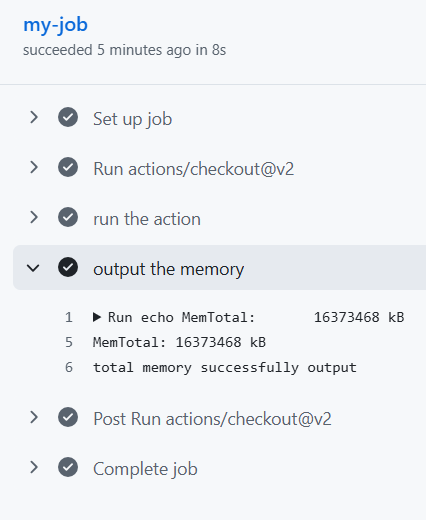
The GitHub Actions job summary looked like this:
✅ my-job  - succeeded in 8s

  ✅ Set up job
  ✅ Run actions/checkout@v2
  ✅ run the action
  ✅ output the memory
      ► Run echo MemTotal:    16373468 kB
        MemTotal:    16373468 kB
        total memory successfully output
  ✅ Post Run actions/checkout@v2
  ✅ Complete job
Key Takeaways
GitHub Actions supports fully custom Docker-based actions - you’re not limited to pre-built actions from the marketplace. Any logic you can put in a container can become a reusable action.
Inputs and outputs are the action’s interface. Inputs arrive as environment variables (INPUT_<NAME>), and outputs are written to $GITHUB_OUTPUT. Understanding this contract is key to building composable, reusable actions.
Deprecations matter in CI/CD. The ::set-output syntax still appears in many tutorials and older labs, but it has been deprecated. Using $GITHUB_OUTPUT is the correct, secure approach going forward.
Container actions give you full control over the runtime. Unlike JavaScript actions that depend on the Node.js version on the runner, a Docker action carries its own environment - making behavior consistent and predictable.
Technologies Used
- GitHub Actions
- Docker / Debian Linux
- Shell scripting (POSIX sh)
- GitHub Actions expression syntax (
${{ steps.<id>.outputs.<name> }})