Overview
In this hands-on I extended an existing CI/CD pipeline to automatically publish a versioned GitHub Release, including a zipped artifact containing all application dependencies, every time new code is pushed. The goal was to give downstream teams a reliable, consistently named artifact they can pull without needing access to the build environment.
Repository
Why This Matters
When multiple teams share a codebase, it’s not enough to just build the code, you need a predictable, versioned artifact that anyone can download at any point. GitHub Releases solves this by attaching downloadable assets to a specific commit, tagged with a version number. Automating that process with GitHub Actions means every successful build produces a release without any manual steps.
Environment Setup
- Created the
labbranch in the forked repository - Created the workflow file from scratch at
.github/workflows/deploy-pipeline.yaml
The workflow is triggered on every push and is structured around three sequential jobs, lint, build, and publish, each depending on the previous one completing successfully.
name: Deploy Lambda Function
on: [push]

jobs:
  lint: ...
  build: ...
  publish: ...
Step 1 - The lint Job
Before building anything, the pipeline validates the Python source code using flake8. This catches syntax errors and undefined names early, preventing bad code from ever reaching the build or release stage.
lint:
  runs-on: ubuntu-latest
  steps:
    - name: Check out code
      uses: actions/checkout@v4
    - name: Set up Python
      uses: actions/setup-python@v2
      with:
        python-version: 3.8
    - name: Install libraries
      run: pip install flake8
    - name: Lint with flake8
      run: |
          cd function
          flake8 . --count --select=E9,F63,F7,F82 --show-source --statistics
          flake8 . --count --exit-zero --max-complexity=10 --max-line-length=127 --statistics
Two flake8 passes are run on purpose. The first (--select=E9,F63,F7,F82) targets critical errors like syntax errors and undefined names, these will fail the job if found. The second pass (--exit-zero) checks for style and complexity issues but is informational only, so it never blocks the pipeline.
Step 2 - The build Job
Once lint passes, the build job checks out the code, installs any dependencies listed in requirements.txt, zips everything together, and uploads the bundle as a named artifact so later jobs can access it.
build:
  runs-on: ubuntu-latest
  needs: lint
  steps:
    - name: Check out code
      uses: actions/checkout@v4
    - name: Set up Python
      uses: actions/setup-python@v2
      with:
        python-version: 3.8
    - name: Install libraries
      run: |
          cd function
          python -m pip install --upgrade pip
          if [ -f requirements.txt ]; then pip install -r requirements.txt -t .; fi
    - name: Zip bundle
      run: |
          cd function
          zip -r ../${{ github.sha }}.zip .
    - name: Archive artifact
      uses: actions/upload-artifact@v4
      with:
        name: zipped-bundle
        path: ${{ github.sha }}.zip
Why needs: lint? Jobs in GitHub Actions run in parallel by default. needs: lint enforces that build only starts after lint succeeds, no point building code that doesn’t pass linting.
Why name the zip after github.sha? Using the SHA hash of the Git commit as the filename guarantees uniqueness per build and makes it trivially easy to trace any artifact back to the exact source commit that produced it.
Why actions/upload-artifact@v4? Artifacts uploaded in one job are not automatically available to other jobs, they must be explicitly passed via the artifact store. The upload-artifact action handles that, and the artifact is referenced later by its name zipped-bundle.
Step 3 - The publish Job
With a clean build artifact available, the publish job creates a GitHub Release and attaches the zip bundle as a downloadable asset.
publish:
  runs-on: ubuntu-latest
  needs: build
  permissions:
    contents: write
  steps:
    - name: Create release
      id: create_release
      uses: actions/create-release@v1
      env:
        GITHUB_TOKEN: ${{ secrets.github_token }}
      with:
        tag_name: ${{ github.run_number }}
        release_name: Release ${{ github.run_number }}
        body: New release for ${{ github.sha }}. Release notes can be found in the docs.
        draft: false
        prerelease: false
    - name: Download artifact
      uses: actions/download-artifact@v4
      with:
        name: zipped-bundle
    - name: Upload release asset
      uses: actions/upload-release-asset@v1
      env:
        GITHUB_TOKEN: ${{ secrets.github_token }}
      with:
        upload_url: ${{ steps.create_release.outputs.upload_url }}
        asset_path: ./${{ github.sha }}.zip
        asset_name: source_code_with_libraries.zip
        asset_content_type: application/zip
Why needs: build? Without this, the publish job could start before the artifact exists. needs: build ensures the zip is always ready before we try to attach it to a release.
Why permissions: contents: write? GitHub recently tightened the default GITHUB_TOKEN to read-only. Creating a release is a write operation, so this permission must be explicitly declared, covered in detail in the troubleshooting section below.
Why github.run_number for the tag? Each workflow run gets an auto-incrementing integer, giving us simple sortable version numbers like Release 12 without managing version files manually.
Why github.sha in the release body? It embeds a direct traceability link, anyone reading the release notes can pinpoint the exact commit that produced it.
Step output chaining: The create_release step exposes upload_url as an output. The Upload release asset step consumes it via ${{ steps.create_release.outputs.upload_url }}. This is a key GitHub Actions pattern, passing data between steps without writing to disk.
🔗 Commit: Add publish step to deploy pipeline
Step 4 - Troubleshooting ❌Errors
Getting all three jobs green required working through several errors. These are worth documenting because each one reflects a real-world CI/CD pitfall.
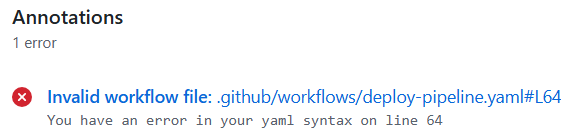
❌Error 1 - YAML Indentation (line 64)
Symptom:
Invalid workflow file: .github/workflows/deploy-pipeline.yaml#L64
You have an error in your yaml syntax on line 64
Cause: The Download artifact step was pasted at the wrong indentation level, making it a sibling of the job block instead of a child of steps. YAML is whitespace-sensitive - even one misaligned space breaks parsing with no warning at write time.
Fix: Corrected the indentation so the step was properly nested under steps.
🔗 Commit: Fix indentation in deploy-pipeline.yaml
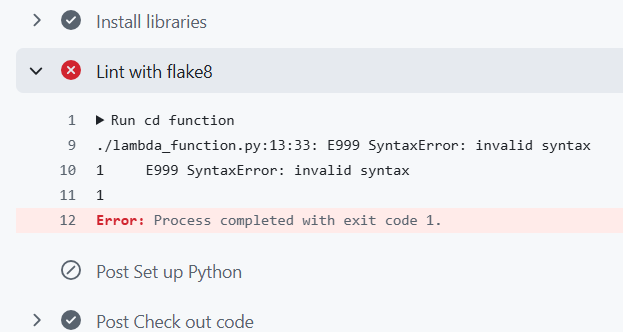
❌Error 2 - Python Syntax in lint Job
Symptom:
./lambda_function.py:13:33: E999 SyntaxError: invalid syntax
Error: Process completed with exit code 1.
Cause: The source file lambda_function.py had a print statement with a missing closing parenthesis, which flake8 flagged as a syntax error.
Fix: Added the missing closing parenthesis:
🔗 Commit: Fix syntax error in print statement
❌Error 3 - Deprecated Action Versions

Symptom:
This request has been automatically failed because it uses a deprecated version
of `actions/upload-artifact: v2`.
Cause: GitHub deprecated v1/v2 of several first-party actions. Referencing them causes an immediate pipeline failure, no graceful fallback.
Fix: Upgraded all referenced actions to their current major versions:
| Action | Old Version | Updated Version |
|---|---|---|
actions/checkout | @v2 | @v4 |
actions/upload-artifact | @v2 | @v4 |
actions/download-artifact | @v2 | @v4 |
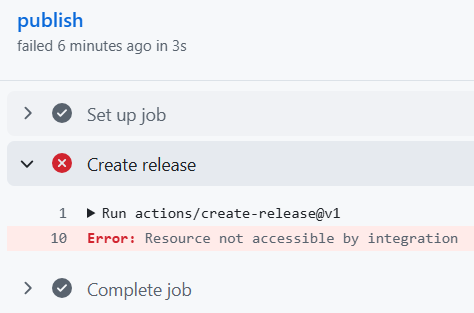
❌Error 4 - GITHUB_TOKEN Permission Denied
Symptom:
Error: Resource not accessible by integration
Cause: GitHub changed the default GITHUB_TOKEN permissions to read-only in newer repositories. The publish job was attempting to create a release, a write operation, without the required permission scope.
Fix: Added an explicit permissions block to the publish job:
publish:
  runs-on: ubuntu-latest
  permissions:
    contents: write
This is a security-conscious default by GitHub, workflows should only request the minimum permissions they need. contents: write explicitly grants the ability to create releases and upload assets.
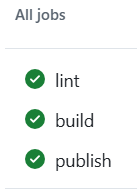
Final Result - All Jobs Green ✅
After all fixes were committed, the full pipeline ran cleanly:
The Releases section of the repository showed:
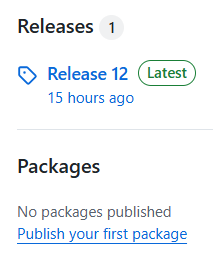
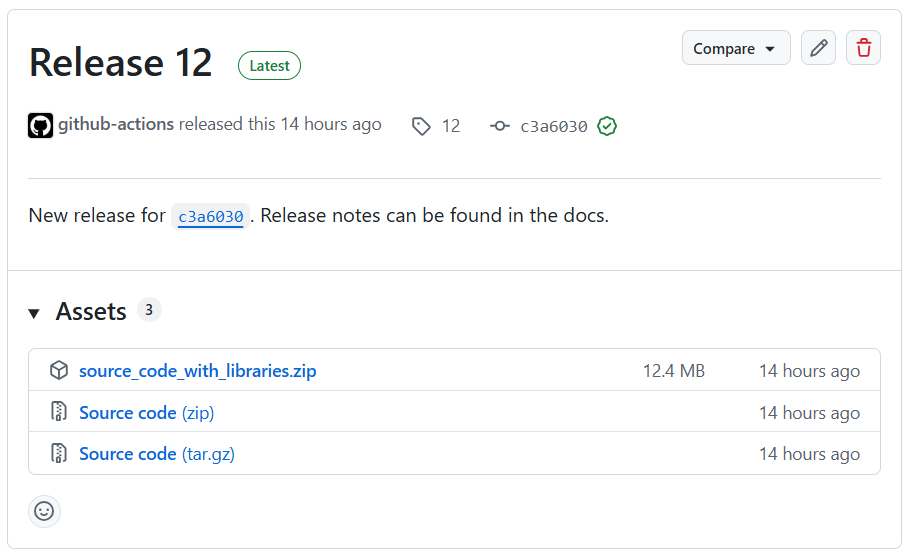
Clicking into the release revealed the attached source_code_with_libraries.zip, ready for any downstream consumer to download.
Complete Workflow File
name: Deploy Lambda Function
on: [push]

jobs:

  lint:
    runs-on: ubuntu-latest
    steps:
      - name: Check out code
        uses: actions/checkout@v4
      - name: Set up Python
        uses: actions/setup-python@v2
        with:
          python-version: 3.8
      - name: Install libraries
        run: pip install flake8
      - name: Lint with flake8
        run: |
            cd function
            flake8 . --count --select=E9,F63,F7,F82 --show-source --statistics
            flake8 . --count --exit-zero --max-complexity=10 --max-line-length=127 --statistics

  build:
    runs-on: ubuntu-latest
    needs: lint
    steps:
      - name: Check out code
        uses: actions/checkout@v4
      - name: Set up Python
        uses: actions/setup-python@v2
        with:
          python-version: 3.8
      - name: Install libraries
        run: |
            cd function
            python -m pip install --upgrade pip
            if [ -f requirements.txt ]; then pip install -r requirements.txt -t .; fi
      - name: Zip bundle
        run: |
            cd function
            zip -r ../${{ github.sha }}.zip .
      - name: Archive artifact
        uses: actions/upload-artifact@v4
        with:
          name: zipped-bundle
          path: ${{ github.sha }}.zip

  publish:
    runs-on: ubuntu-latest
    needs: build
    permissions:
      contents: write
    steps:
      - name: Create release
        id: create_release
        uses: actions/create-release@v1
        env:
          GITHUB_TOKEN: ${{ secrets.github_token }}
        with:
          tag_name: ${{ github.run_number }}
          release_name: Release ${{ github.run_number }}
          body: New release for ${{ github.sha }}. Release notes can be found in the docs.
          draft: false
          prerelease: false
      - name: Download artifact
        uses: actions/download-artifact@v4
        with:
          name: zipped-bundle
      - name: Upload release asset
        uses: actions/upload-release-asset@v1
        env:
          GITHUB_TOKEN: ${{ secrets.github_token }}
        with:
          upload_url: ${{ steps.create_release.outputs.upload_url }}
          asset_path: ./${{ github.sha }}.zip
          asset_name: source_code_with_libraries.zip
          asset_content_type: application/zip
Key Takeaways
- GitHub’s default token permissions are read-only - any job that writes to the repo (releases, packages, PRs) needs an explicit
permissions: contents: writeblock. - Action versions matter - deprecated versions fail immediately with no graceful fallback. Keeping actions current is part of pipeline maintenance.
- YAML indentation errors are silent killers - a misaligned step only fails at runtime. Using the GitHub editor’s inline validation or a local YAML linter catches these before pushing.
- Step output chaining (
steps.<id>.outputs.<key>) is a clean pattern for passing data between steps without writing to disk. needsis required for artifact sharing - jobs run in parallel by default. Without explicitneeds, a downstream job can start before its dependency has produced its output.- Two-pass linting is a useful pattern - separating hard failures (syntax errors) from informational warnings (style) lets you enforce quality gates without blocking on minor issues.