Overview
In most CI/CD setups, GitHub provides its own cloud-hosted runners to execute your workflows. But what happens when your organization has compliance requirements that forbid code from running on third-party infrastructure? That’s the exact scenario this hand-on addresses.
In this walkthrough, I provisioned an AWS EC2 instance as a self-hosted GitHub Actions runner, wrote a workflow that targets it exclusively, verified the job ran successfully, and then cleanly deregistered the runner, all the steps you’d follow in a real production environment.
Why Self-Hosted Runners?
GitHub-hosted runners are convenient, but they come with trade-offs:
- Compliance & Data Sovereignty - Some regulated industries (finance, healthcare, government) require that code and build artifacts never leave the organization’s own infrastructure.
- Custom Environments - Need specific hardware, OS versions, or pre-installed tools? Self-hosted runners give you full control.
- Cost at Scale - For high-volume pipelines, running on your own servers can be significantly cheaper.
In this lab, the compliance requirement was the driving force: the repository’s workflows must run on organization-owned infrastructure, not GitHub’s.
Environment
| Resource | Details |
|---|---|
| Cloud Provider | AWS |
| Instance OS | Amazon Linux 2 |
| Runner Version | v2.334.0 |
| Architecture | x64 |
| GitHub Repo | needs-custom-runner (Private) |
Step 1 - Create the GitHub Repository
The first step was creating a private repository. Privacy is important here because only authorized collaborators should be able to trigger workflows on a runner that executes on internal infrastructure.
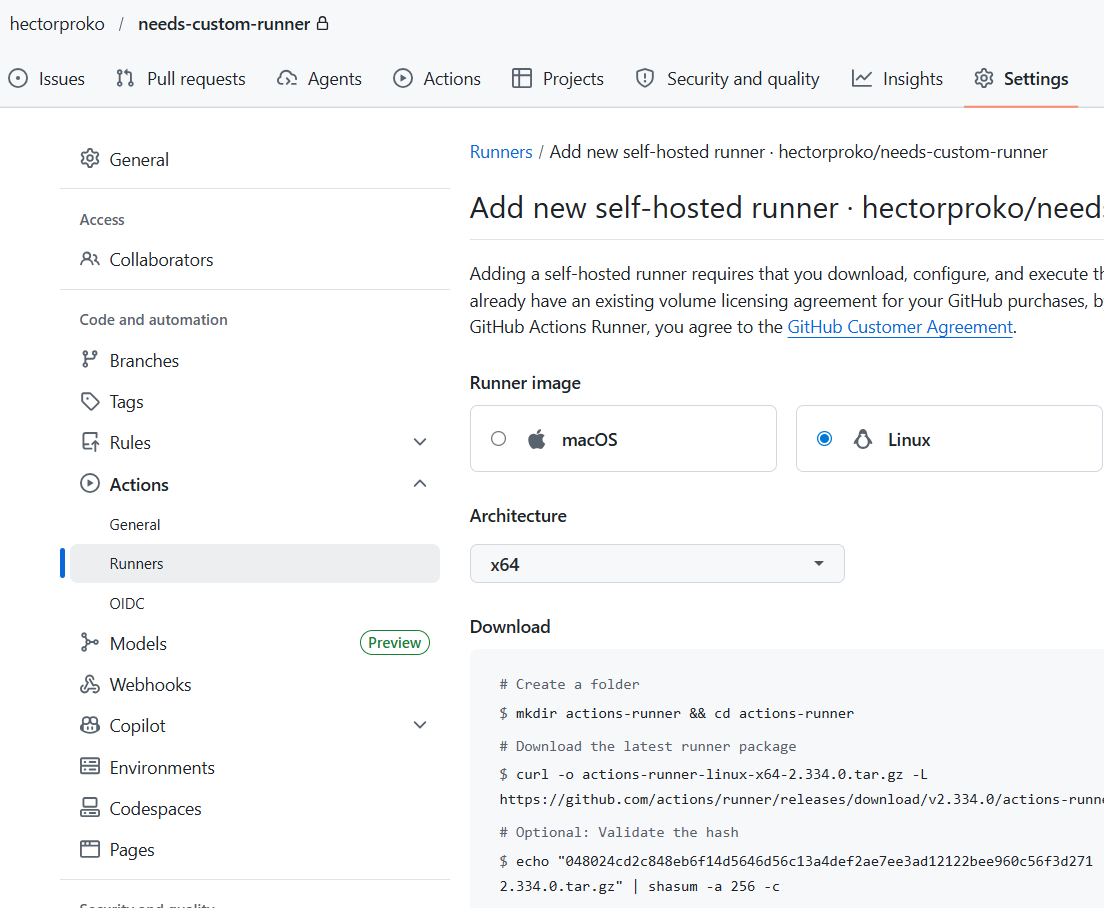
Settings path used: GitHub → Settings → Actions → Runners → New self-hosted runner
GitHub then displays a set of shell commands tailored to the selected OS (Linux, x64) for downloading, configuring, and starting the runner.
Step 2 - Configure the EC2 Instance as a Runner
After SSHing into the EC2 instance, I ran the commands provided by GitHub one at a time.
Connect to the Instance
ssh cloud_user@100.27.37.87Output:
Warning: Permanently added '100.27.37.87' (ED25519) to the list of known hosts.
cloud_user@100.27.37.87's password:
Last login: Sat May 9 13:21:26 2026

       __|  __|_  )
       _|  (     /   Amazon Linux 2
      ___|\___|___|

AL2 End of Life is 2026-06-30.
Create the Runner Directory and Download the Package
mkdir actions-runner && cd actions-runner

curl -o actions-runner-linux-x64-2.334.0.tar.gz -L \
  https://github.com/actions/runner/releases/download/v2.334.0/actions-runner-linux-x64-2.334.0.tar.gz
Output:
  % Total    % Received % Xferd  Average Speed   Time    Time     Time  Current
                                 Dload  Upload   Total   Spent    Left  Speed
100  214M  100  214M    0     0   388M      0 --:--:-- --:--:-- --:--:--  441M
Validate the Checksum
Before extracting anything, I verified the package integrity using SHA-256 - a good security habit to confirm the download wasn’t tampered with or corrupted.
echo "048024cd2c848eb6f14d5646d56c13a4def2ae7ee3ad12122bee960c56f3d271  actions-runner-linux-x64-2.334.0.tar.gz" \
  | shasum -a 256 -c
Output:
actions-runner-linux-x64-2.334.0.tar.gz: OK
Extract and Configure
tar xzf ./actions-runner-linux-x64-2.334.0.tar.gz

./config.sh --url https://github.com/hectorproko/needs-custom-runner --token <TOKEN>
Output:
--------------------------------------------------------------------------------
|        ____ _ _   _   _       _          _        _   _
|       / ___(_) |_| | | |_   _| |__      / \   ___| |_(_) ___  _ __  ___
|      | |  _| | __| |_| | | | | '_ \    / _ \ / __| __| |/ _ \| '_ \/ __|
|      | |_| | | |_|  _  | |_| | |_) |  / ___ \ (__| |_| | (_) | | | \__ \
|       \____|_|\__|_| |_|\__,_|_.__/  /_/   \_\___|\__|_|\___/|_| |_|___/
|
|                    Self-hosted runner registration
|
--------------------------------------------------------------------------------

# Authentication
√ Connected to GitHub

# Runner Registration
Enter the name of the runner group to add this runner to: [press Enter for Default]
Enter the name of runner: [press Enter for ip-10-0-1-112]
This runner will have the following labels: 'self-hosted', 'Linux', 'X64'
Enter any additional labels (ex. label-1,label-2): [press Enter to skip]
√ Runner successfully added

# Runner settings
Enter name of work folder: [press Enter for _work]
√ Settings Saved.
I accepted all defaults: runner group, runner name, and work folder. GitHub automatically assigned the labels self-hosted, Linux, and X64 - these labels are what workflows use to target specific runners.
Start the Runner
./run.shOutput:
√ Connected to GitHub
Current runner version: '2.334.0'
2026-05-09 15:24:55Z: Listening for Jobs
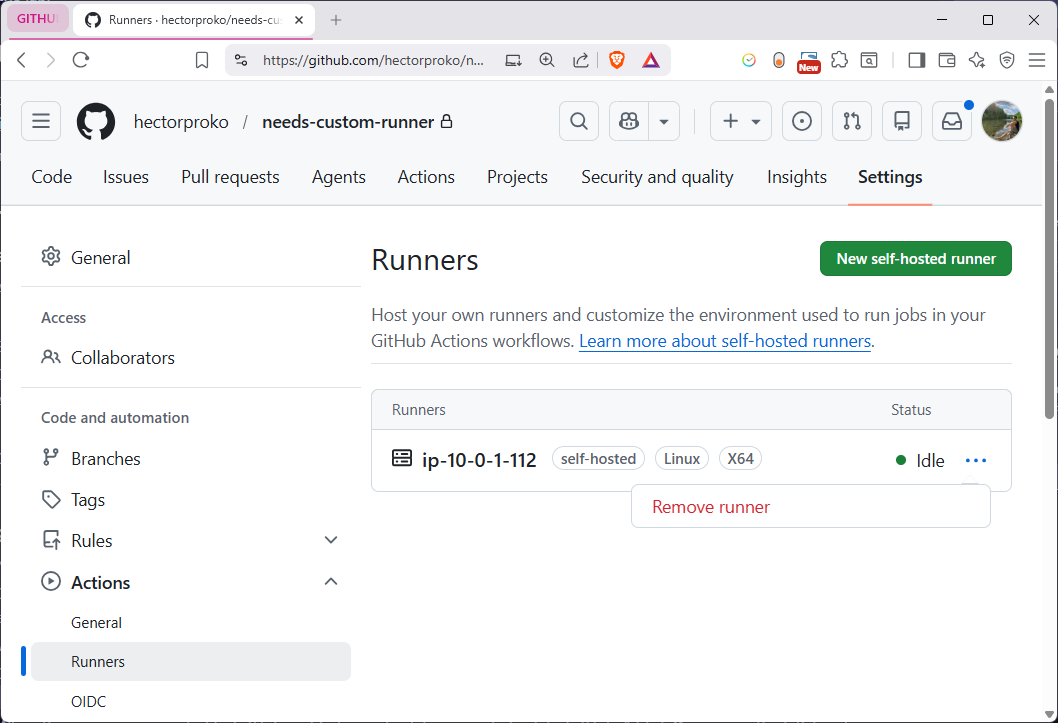
At this point the runner is live and polling GitHub for incoming jobs. Back in GitHub under Settings → Actions → Runners, the runner appeared with an Idle status, confirming the connection was successful.
Step 3 - Create a Workflow That Targets the Runner
With the runner registered, the next step was creating a workflow that explicitly routes to it using the self-hosted label.
In the repository I navigated to: Code → Add file → Create new file
File path: .github/workflows/action.yaml
name: Must run on custom runner

on: push

jobs:
  init:
    runs-on: self-hosted
    steps:
      - run: echo 'hello world hector'
      - run: echo $HOSTNAME
Key detail: runs-on: self-hosted is what directs GitHub Actions to route this job to a self-hosted runner instead of a GitHub-managed one. If no self-hosted runner is available, the job will queue and wait - it won’t silently fall back to a GitHub runner.
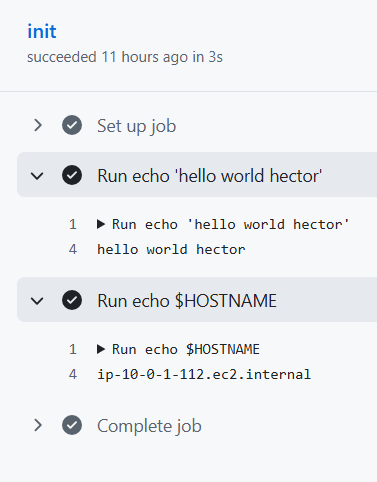
After committing the file, the push event triggered the workflow automatically. In the Actions tab the run appeared as Must run on custom runner #1.
Step 4 - Verify the Job Ran on the EC2 Instance
Switching back to the VM terminal confirmed the runner picked up the job and executed it:
2026-05-09 15:43:10Z: Listening for Jobs
2026-05-09 15:43:59Z: Running job: init
2026-05-09 15:44:01Z: Job init completed with result: Succeeded
The job ran and completed in roughly 2 seconds. The echo $HOSTNAME step would have printed the EC2 instance’s internal hostname (ip-10-0-1-112), proving the code executed on our machine, not GitHub’s infrastructure.
Step 5 - Deregister the Runner
The Correct Way
The proper way to remove a self-hosted runner is from the VM first. The flow should be:
- Press
CTRL+Cin the VM terminal to stop./run.sh - Run
./config.sh remove --token <REMOVAL_TOKEN>from the VM - The agent gracefully notifies GitHub, deregisters itself, and cleans up local credentials
- GitHub automatically removes the runner entry on its end
This ensures there’s no window where GitHub thinks a runner is still alive when it isn’t.
What I Actually Did
I did it in the wrong order, I clicked “Remove runner” in the GitHub UI first, which immediately deleted the runner record on GitHub’s side. Then I ran the remove command from the VM:
bash
# CTRL+C to stop ./run.sh first, then:
./config.sh remove --token <REMOVAL_TOKEN>
Output:
# Runner removal
Does not exist. Skipping Removing runner from the server
√ Runner removed successfully
√ Removed .credentials
√ Removed .runner
The line Does not exist. Skipping Removing runner from the server is the telltale sign, when the VM script tried to notify GitHub of the deregistration, GitHub had no record of the runner anymore because it was already deleted from the UI. The script skipped that step but still cleaned up the local credential files (.credentials and .runner) on the VM.
The end result was the same, runner gone from GitHub, credentials wiped from the VM, just arrived there in reverse order. In a production environment though, the UI-first approach could leave a brief window where a runner’s local credentials exist on a machine that GitHub no longer tracks, which is a cleaner loose end to avoid.
Summary
| Step | What Was Done | Why It Matters |
|---|---|---|
| Created private repo | Set up needs-custom-runner | Restricts who can trigger jobs on internal infrastructure |
| Downloaded & configured runner | Installed agent on EC2 | Links the machine to GitHub as a trusted executor |
| Validated checksum | SHA-256 hash check | Ensures the runner binary wasn’t corrupted or tampered with |
| Created workflow | .github/workflows/action.yaml with runs-on: self-hosted | Routes CI jobs to our machine instead of GitHub’s cloud |
| Verified job execution | Confirmed output in VM terminal | Proves compliance - code ran on org infrastructure |
| Graceful deregistration | config.sh remove from VM | Cleanly removes credentials and deregisters the runner |
Key Takeaways
- Self-hosted runners give organizations full control over where their CI/CD pipelines execute.
- The
runs-on:key in a workflow YAML is the routing mechanism - labels likeself-hosted,Linux, andX64determine which runner picks up a job. - Always validate checksums before running downloaded binaries, especially in automated pipelines.
- Deregister runners from the agent side using
config.sh removefor a clean, credentialless teardown.